
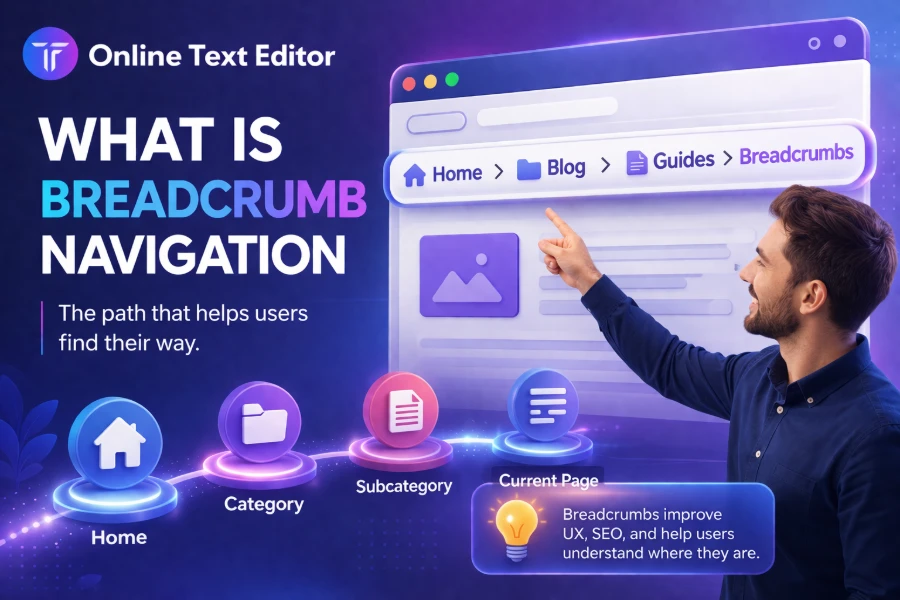
Breadcrumb navigation is one of those subtle website features that quietly improves how you move through pages without getting lost. If you have ever clicked through a website and noticed a small trail like “Home > Blog > Article,” you have already used it.
Understanding how breadcrumb navigation works can help you design better websites, improve user experience, and even boost your SEO performance. This guide breaks everything down in a clear and practical way so you can apply it immediately.
What Is Breadcrumb Navigation
Breadcrumb navigation is a secondary navigation system that shows you your current location within a website’s structure. It appears as a horizontal trail of links, usually near the top of a page, that help you easily move back to previous sections.
It works like a map that keeps you oriented, especially when you land on a page from a search engine rather than the homepage. While editing content and formatting website text, tools like the small fonts text generator help structure text clearly, which complements breadcrumb navigation by improving readability and visual hierarchy.
You will mostly see breadcrumb navigation on large websites, ecommerce platforms, and blogs with deep content layers. It ensures that you never feel stuck or confused while navigating through multiple pages.
Why Breadcrumb Navigation Is Important
Breadcrumb navigation plays a key role in improving user interaction with a website. It reduces confusion and helps you quickly understand where you are and how to move around without relying on the back button.
When users can easily navigate, they tend to stay longer and explore more pages, which reduces bounce rates. Studies show that improved navigation systems can increase user engagement by over 20 percent, especially on complex websites.
Search engines also benefit from breadcrumb navigation because it clarifies the structure of your website. This helps search engines index pages better and display structured results in search listings.
Types Of Breadcrumb Navigation
There are three main types of breadcrumb navigation, each serving a different purpose. Understanding these types helps you decide which one works best for your website.
Location-based breadcrumbs show your position in the site hierarchy and are the most commonly used. When learning content structures and page organization, resources like what is a text editor explain how structured environments help manage content layers effectively.
Path-based breadcrumbs reflect the exact steps you took to reach a page, while attribute-based breadcrumbs display filters such as categories, sizes, or colors in ecommerce websites.
How Breadcrumb Navigation Improves User Experience
Breadcrumb navigation makes your browsing experience smoother by reducing the number of clicks needed to move around a website. Instead of starting over, you can jump directly to a previous section with one click.
It also provides context, which helps you understand how pages are related to each other. This is especially useful when you land on a Google page and need to quickly explore related content.
Another key advantage is accessibility, as breadcrumbs support users who rely on structured navigation patterns. This makes your website more inclusive and easier to use for everyone.
Breadcrumb Navigation And SEO Benefits
Breadcrumb navigation supports SEO by strengthening internal linking and improving site structure. Search engines use these links to understand how your pages connect and which content is most important.
When implemented correctly, breadcrumbs can appear in search results, replacing long URLs with clean, readable paths. This improves click-through rates because users can quickly understand what the page is about.
They also distribute link equity across your website, helping important pages rank better. This makes breadcrumb navigation a powerful yet often overlooked SEO strategy.
Where Breadcrumb Navigation Is Most Useful
Breadcrumb navigation is most effective on websites with multiple layers of content. Ecommerce stores, blogs, and educational platforms benefit the most from this feature.
If your site has only a few pages, breadcrumbs may not add much value and could even clutter the interface. However, once your structure becomes complex, they become essential for navigation.
They are also useful for mobile users, where screen space is limited and efficient navigation is critical. A simple breadcrumb trail can significantly improve usability on smaller devices.
Best Practices For Breadcrumb Navigation
To get the most out of breadcrumb navigation, you should follow a few best practices. These ensure that the feature remains helpful rather than confusing.
Keep the breadcrumb trail simple and avoid unnecessary levels that could overwhelm users. When managing text content across pages, guides like how to copy text from browser show how structured copying improves consistency, which aligns with a clean breadcrumb design.
Always start with the homepage and use clear labels that match your site structure. This ensures that users can easily understand and follow the navigation path.
Common Mistakes To Avoid
One common mistake is using breadcrumbs as the primary navigation system instead of a secondary aid. This can confuse users and make navigation less effective.
Another issue is inconsistent labeling, which makes it harder for users to recognize patterns across pages. Always keep naming consistent and intuitive.
Avoid overloading breadcrumbs with too many levels, as this defeats their purpose. Simplicity is key when designing effective navigation systems.
Breadcrumb Navigation In Ecommerce Websites
Ecommerce platforms rely heavily on breadcrumb navigation to help users browse products efficiently. It allows customers to move between categories without losing their place.
Attribute-based breadcrumbs are especially useful in online stores, where filters such as size, color, and brand are available. These breadcrumbs help users refine their searches quickly.
This improves the shopping experience and increases the likelihood of conversions. When users can navigate easily, they are more likely to complete purchases.
Breadcrumb Navigation And Mobile Design
Mobile users need fast and efficient navigation due to limited screen space. Breadcrumb navigation provides a compact way to move across pages without cluttering the interface.
Responsive design ensures that breadcrumbs adapt to smaller screens while remaining functional. This improves usability and keeps users engaged on mobile devices.
With mobile traffic accounting for over 50% of web traffic, optimizing breadcrumb navigation for mobile is essential. It ensures that your site remains user-friendly across all devices.
How To Implement Breadcrumb Navigation
Implementing breadcrumb navigation requires a clear understanding of your website structure. Start by organizing your pages into logical categories and subcategories.
Then create a breadcrumb trail that reflects this hierarchy, ensuring that each link leads to a relevant section. This improves both usability and SEO performance.
You can use structured data markup to help search engines recognize your breadcrumbs. This increases the chances of displaying them in search results.
Breadcrumb Navigation Vs Traditional Navigation
Traditional navigation menus provide broad access to a website’s sections. Breadcrumb navigation, on the other hand, focuses on showing your current location within the structure.
Both systems work best when used together rather than separately. Breadcrumbs enhance the main navigation by adding context and improving usability.
This combination creates a seamless browsing experience that keeps users engaged and reduces frustration.
Conclusion
Breadcrumb navigation is a simple yet powerful feature that enhances user interaction with your website. It provides clarity, reduces confusion, and helps users move through pages more efficiently.
By improving user experience and supporting SEO, breadcrumbs play a crucial role in modern web design. They help both users and search engines understand your site structure better.
When implemented correctly, breadcrumb navigation can transform how people explore your website and significantly improve engagement, making it a must-have feature for any well-structured site.
FAQs
What is breadcrumb navigation in simple terms?
Breadcrumb navigation is a secondary website navigation system that shows your current location within a site’s structure. It appears as a trail of links, helping you move back to previous pages easily without relying on the browser’s back button.
Why is breadcrumb navigation important for SEO?
Breadcrumb navigation improves SEO by helping search engines understand your site structure and internal linking. It also enhances user experience, reduces bounce rates, and can appear in search results, making your pages more attractive and easier to navigate.
How does breadcrumb navigation improve user experience
Breadcrumb navigation improves the user experience by providing clear context about a user’s location on a website. It lets you quickly navigate back to higher-level pages, reducing frustration and helping you explore related content without getting lost or confused.
What are the main types of breadcrumb navigation?
The main types include location-based breadcrumbs that show the site hierarchy, path-based breadcrumbs that reflect your browsing steps, and attribute-based breadcrumbs used in ecommerce to display selected filters, such as category, size, or color, for easier product navigation.
When should you use breadcrumb navigation on a website
You should use breadcrumb navigation when your website has multiple layers or complex structures, such as ecommerce stores or blogs. It is especially useful when users land on deeper pages and need guidance to efficiently explore related sections.
Can breadcrumb navigation reduce bounce rates
Yes, breadcrumb navigation can reduce bounce rates by making it easier for users to explore other sections of your website. Instead of leaving after viewing one page, users can quickly navigate to related content and continue browsing without confusion.
Where should breadcrumb navigation be placed on a webpage
Breadcrumb navigation is typically placed at the top of a webpage, just below the main navigation menu. This position ensures it is visible and accessible, allowing users to understand their location and move between sections without interrupting their browsing experience.
Is breadcrumb navigation necessary for small websites
Breadcrumb navigation is not always necessary for small websites with simple structures. If your site has only a few pages, it may add little value, but it becomes essential as your content grows and navigation complexity increases significantly.
How do breadcrumb navigation and internal linking work together
Breadcrumb navigation strengthens internal linking by connecting related pages within a structured hierarchy. This helps search engines crawl your website more effectively while also guiding users through logical paths, improving both SEO performance and overall usability.
Does breadcrumb navigation work well on mobile devices
Breadcrumb navigation works well on mobile devices when designed responsively. It provides a compact and efficient way to navigate complex websites, helping users move between pages quickly without cluttering the screen or disrupting the mobile browsing experience.